IPF
IPF stands for iterative proportional fitting. In SynthPopCan, IPF adjusts seed record weights until the weighted totals match control tables.
Concept
Imagine we have a small set of example people:
PP_ID,AGEGRP,SEX,WEIGHT
11101,adult,F,1
11102,child,M,1
And a control table says the target population should contain 100 adults, 100 children, 100 females, and 100 males:
margin,dimensions,AGEGRP,SEX,count
age,AGEGRP,adult,,100
age,AGEGRP,child,,100
sex,SEX,,F,100
sex,SEX,,M,100
IPF does not create new variables. It changes the row weights so the selected columns add up to the requested controls.
The method is also known as raking in survey weighting and has a long history in contingency-table adjustment. In spatial microsimulation, IPF commonly produces non-integer weights, which is why SynthPopCan keeps weighted output separate from expanded rows.
That separation matters. Fitting weights and realizing an integer population are different stages. A weighted seed can be the right analytical object for validation and review, while an expanded CSV is a rounded realization of those weights. The older Pritchard and Miller-style population-synthesis workflow makes a similar distinction: first fit/calibrate sparse microdata rows to margins, then allocate or sample integer households and persons.
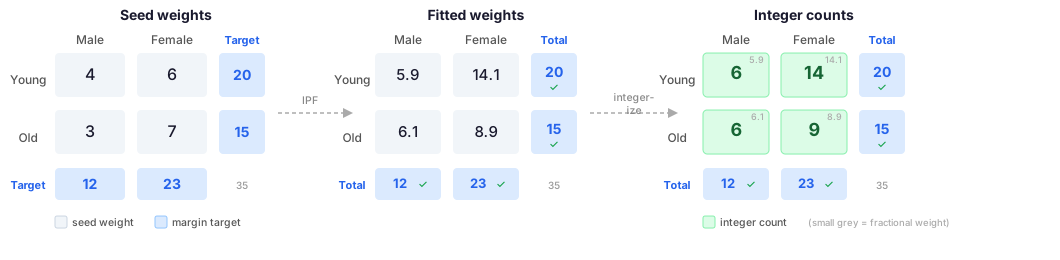
The three stages of IPF. Fitting adjusts the seed weights (left table) until each margin matches its target. Integerization is a separate step that converts fractional fitted weights (centre) into whole counts (right) while keeping the margin totals exact.
This is powerful, but it has limits:
the seed must already contain every control dimension;
category labels must match or be mapped;
the seed must contain examples for controlled categories;
control totals must be consistent enough to fit;
sparse or overly detailed margins can make a fit unstable or impossible.
When Controls Cannot Be Fit
IPF can only redistribute weight among rows that already exist in the seed. This is the most important limitation to understand. IPF cannot invent a missing category, add a missing column, or repair controls that describe a different population universe.
Some failures are structural. They cannot be solved by increasing the number of iterations:
Missing dimension: controls use a column such as
education, but the seed has noeducationcolumn. The seed must be enriched first, or the controls must be changed.Missing category: controls require
sex=M, but every seed record hassex=F. There is no row that can receive the male weight.Missing joint cell: one-way controls may look covered, but a joint control such as
age=child,sex=Mcannot be fit if there are no child male seed rows.Mismatched labels: controls use
FemaleandMale, while the seed usesFandM. This is often fixable with a mapping step.Different universes: one margin counts all residents, while another counts only private households, adults, families, or a different year/geography. The totals may not be logically comparable.
Inconsistent margin totals: an age margin totals 100 people but a sex margin totals 110 people for the same supposed population. IPF can reduce residuals, but it cannot satisfy both exactly.
Overly detailed sparse controls: many fine-grained controls can make the seed too thin. A fit may technically converge but produce extreme weights that make only a few rows carry most of the population.
For a humanities or digital-humanities project, the practical question is not only “does the algorithm converge?” It is “do these controls describe the same population, in categories the seed can represent, at a level of detail the seed can support?” Naszodi’s discussion of IPF and related matrix-adjustment methods is useful here because it separates the mechanics of fitting from the interpretive question being asked.
Examples of Impossible Controls
If the seed is:
id,age,sex
1,adult,F
2,child,F
this control table cannot be fit:
margin,dimensions,age,sex,count
sex,sex,,M,50
sex,sex,,F,50
The target sex=M has no seed records. IPF has nowhere to put that weight.
This control table also cannot be fit unless the seed is enriched:
margin,dimensions,education,count
education,education,university,40
education,education,no_certificate,60
The seed has no education column, so this is not a fitting problem. It is a
data-design problem.
This pair of margins is conceptually inconsistent if both are supposed to describe the same population:
margin,dimensions,age,sex,count
age,age,adult,,60
age,age,child,,40
sex,sex,,F,70
sex,sex,,M,40
The age margin totals 100. The sex margin totals 110. A report can show which cells are closest or farthest, but an exact fit is not possible without changing the controls.
What check-inputs Can and Cannot Catch
Run ipf check-inputs before fitting. It catches missing columns, missing
control categories, and unused seed categories:
synthpopcan ipf check-inputs \
  --seed seed.csv \
  --controls controls.csv
check-inputs is a compatibility check, not a full proof that the controls are
methodologically appropriate. It cannot decide whether two public tables use the
same population universe. It cannot know whether a geography is too small for
the interpretive claim. It also cannot promise that a converged fit will have
reasonable weights.
After fitting, inspect the fit report:
synthpopcan ipf report fit-report.json
Look for:
non-convergence;
inconsistent control-total warnings;
large residuals concentrated in one margin;
cells that cannot be represented by the seed;
extreme or surprising fitted weights in the output CSV.
When a Successful Fit Is Still a Bad Fit
Convergence is not the same as validity. A converged IPF run means the algorithm found weights that match the supplied controls within the requested tolerance. It does not mean the controls were the right controls, the seed was representative, or the generated population is appropriate for interpretation.
Common methodological problems include:
The controls are too thin. Matching only age and sex does not preserve relationships among income, household structure, language, migration, education, or geography. Uncontrolled variables remain shaped by the seed.
The controls are too ambitious. Adding many detailed margins can force the algorithm to put very large weights on a few rows. The result may match the table but be driven by fragile examples.
One-way margins hide joint patterns. Matching age totals and sex totals separately does not guarantee the age-by-sex distribution is right.
Joint margins can overconstrain the seed. A detailed age-by-sex-by-tenure control may be conceptually useful but impossible if the seed lacks support for some cells.
The seed carries bias forward. IPF changes weights, not row content. If the seed underrepresents a group or encodes a biased relationship, IPF can amplify that structure.
Extreme weights reduce effective diversity. A weighted population can look large while only a small number of seed records do most of the work.
Integer expansion changes the object. Expanding fractional weights into rows requires rounding. The expanded CSV may no longer match controls exactly, especially for small populations.
Validation is scoped to what we validate. A control-validation report checks selected margins. It does not certify every other relationship in the output.
Once we have fitted weights we are satisfied with, use Validate to compare the output against the controls and produce a shareable validation report. The validate page also explains what a validation report does and does not prove.
Additional issues that deserve explicit notes in a research workflow:
Structural zeros versus sampling zeros: a missing cell can mean the combination is impossible in the real world, or it can mean the seed did not observe it. Those are different problems. IPF treats both as “no row available.”
Controls are often estimates or rounded counts: public tables can include survey error, random rounding, suppression, or disclosure treatment. Matching them exactly can imply more precision than the source supports.
Household and person controls are different units: a household-tenure margin and a person-age margin cannot be applied to the same seed table unless the rows and weights have been designed for that unit.
Household and person controls may need coordinated fitting: separate fits can produce household totals and person totals that each look reasonable but do not agree with each other. A serious linked-population workflow needs a coordinated strategy for household and person controls, not two unrelated CSVs.
Geography changes the claim: controls for a city, census subdivision, tract, or dissemination area may imply different populations. Aggregating or disaggregating controls is a modelling choice, not a neutral file operation.
Time changes the claim: controls from one census year and seed data from another year can be useful for scenarios, but the output should be described as a hybrid, not as a direct reconstruction.
Survey weights have their own meaning: if the seed already contains survey weights, IPF starts from a weighted design. The fitted weights are not raw counts; they are a second-stage calibration product.
Zero and near-zero weights matter: rows with tiny fitted weights may be effectively removed, while rows with huge weights may dominate. Both affect interpretability.
A fit can mask a bad seed: if the seed lacks diversity, IPF can still match simple margins by repeatedly using the same few row types.
Tolerance is not a judgement of importance: a small absolute residual can be large for a small group, while a larger residual can be minor for a large group. Inspect relative error when small populations matter.
For humanities work, a good IPF workflow should explain why these controls were chosen, what they do not measure, and what interpretive claims the fitted output can and cannot support.
Questions to Ask Before Fitting
Before treating a set of controls as usable, ask:
Do all margins describe the same population universe?
Are the geography, year, age bands, and household definitions compatible?
Are these controls important to the research question, or merely available?
Does the seed contain the variables and categories being controlled?
Are the categories broad enough to have support?
Would a joint control be necessary for the interpretation?
Would a smaller set of controls produce more stable weights?
Are any source counts rounded, suppressed, estimated, or otherwise treated?
Are household-level and person-level controls being kept separate?
If both household and person controls are used, how will the fit preserve household/person consistency?
Are zeros in the seed true impossibilities or just missing examples?
What output will be shared: weights, expanded rows, reports, or a derived analysis?
If the answer is unclear, keep the workflow exploratory and document the uncertainty. Do not treat exact-looking numbers as exact knowledge.
Getting Started
Export a seed from the tiny fixture:
synthpopcan microdata export-seed \
  tests/fixtures/workflows/microdata_ipf/hierarchical.csv \
  --input-format statcan-2016-hierarchical \
  --columns AGEGRP,SEX \
  --out seed.csv
Check compatibility before fitting:
synthpopcan ipf check-inputs \
  --seed seed.csv \
  --controls tests/fixtures/workflows/microdata_ipf/controls.csv
Fit weights and write a JSON report:
synthpopcan ipf fit \
  --seed seed.csv \
  --controls tests/fixtures/workflows/microdata_ipf/controls.csv \
  --weight-field WEIGHT \
  --out weights.csv \
  --report fit-report.json
Read the report:
synthpopcan ipf report fit-report.json
Validate the fitted weights:
synthpopcan validate controls \
  --population weights.csv \
  --controls tests/fixtures/workflows/microdata_ipf/controls.csv \
  --kind weights
Subcommands
ipf check-inputs
Checks whether a seed CSV has the columns and category values required by a control table.
synthpopcan ipf check-inputs \
  --seed seed.csv \
  --controls controls.csv
Options:
--seed PATH: seed records CSV.--controls PATH: normalized long control CSV.--format table|json: readable table output or machine-readable JSON.
Use this before every fit. It is easier to fix a missing column or category mapping before running IPF.
ipf fit
Fits seed rows to controls and writes compact fitted weights.
synthpopcan ipf fit \
  --seed seed.csv \
  --controls controls.csv \
  --weight-field WEIGHT \
  --out weights.csv \
  --report fit-report.json
Options:
--seed PATH: seed records CSV.--controls PATH: normalized long control CSV.--out PATH: fitted weights CSV.--weight-field NAME: optional initial weight column in the seed.--max-iterations INTEGER: maximum fitting iterations.--tolerance FLOAT: convergence tolerance.--allow-nonconverged: write weights even if the fit does not converge.--report PATH: JSON fit report path.
By default, non-converged fits fail before writing weights. Use
--allow-nonconverged only for deliberate diagnostic work.
ipf report
Prints a readable summary from a JSON report produced by ipf fit --report.
synthpopcan ipf report fit-report.json
synthpopcan ipf report fit-report.json --format json
ipf expand
Expands fitted weights into one row per generated synthetic record.
synthpopcan ipf expand \
  --weights weights.csv \
  --out synthetic.csv
Options:
--weights PATH: fitted weights CSV.--out PATH: expanded output CSV.--weight-field NAME: fitted weight column, defaultweight.
If ipf fit wrote a fitted_weight column because the seed already had a
weight column, pass --weight-field fitted_weight.
ipf suggest-controls
Suggests possible calibration-control directions from generated rows.
synthpopcan ipf suggest-controls \
  --seed candidate-households.csv \
  --unit household
This command is advisory. It helps identify generated columns that might be usable controls, but the researcher still chooses the source table and category mapping.
Worked Example: Model Output to IPF
Tree models can generate a candidate population before IPF calibration. This is useful when the tree workflow can generate variables that are not present in a small hand-built seed file, such as household size or tenure.
Generate candidate households and people from a reviewed linked-model package:
synthpopcan models list
synthpopcan tree generate-from-package demo-linked-household-person \
  --households 100 \
  --households-out candidate-households.csv \
  --persons-out candidate-persons.csv
generate-from-package accepts either a local package JSON path or a model ID
from models list. Larger published model IDs must be fetched first with
synthpopcan models fetch MODEL_ID.
Then check whether the candidate household rows can satisfy the controls:
synthpopcan ipf check-inputs \
  --seed candidate-households.csv \
  --controls household-controls.csv
Fit and expand the calibrated household rows:
synthpopcan ipf fit \
  --seed candidate-households.csv \
  --controls household-controls.csv \
  --out calibrated-household-weights.csv \
  --report fit-report.json

synthpopcan ipf expand \
  --weights calibrated-household-weights.csv \
  --out calibrated-households.csv
IPF cannot create missing variables. If the controls use tenure, the seed or
candidate population must already contain a compatible tenure column. If the
controls use household age-sex composition, a household-only candidate file is
not enough; generate or join the person-level rows first and validate the linked
population before calibration.
Troubleshooting
Missing control column: export or add that column to the seed first. IPF cannot create absent variables.
Category mismatch: map or recode labels before fitting. Examples include
Female versus F, or source age labels versus local age codes.
Positive target has no seed records: the control asks for a category or joint category that the seed cannot represent. Add appropriate seed records, choose a broader category, use a generated candidate population that contains the variable, or drop that control.
Control margins have different totals: check whether the source tables refer to the same geography, year, population universe, and filtering rules. Do not force together controls for incompatible populations just because the column names look similar.
Non-convergence: inspect fit-report.json, check for inconsistent controls,
sparse seed coverage, wrong geography, or mixed population universes.
Converged fit has implausible weights: convergence only means the requested math worked. Inspect large weights, consider fewer or broader controls, and validate whether a small number of seed rows now dominate the output.
A joint margin fails but one-way margins work: the seed may contain each category separately but not the required combination. For example, the seed may have children and males, but no male children.
Huge output: keep weights.csv unless another tool truly needs expanded
rows.
Further Reading
Overview: Iterative proportional fitting.
Anna Naszodi, The iterative proportional fitting algorithm and the NM-method: solutions for two different sets of problems, for a caution about using IPF for counterfactual questions rather than sample-to-margin adjustment.
Robin Lovelace and Dimitris Ballas, Truncate, replicate, sample, for why integerizing IPF weights is a separate step with its own choices.