Controls
A control table records what a population is supposed to look like, expressed as aggregate totals: 200 adults, 180 females, 60 households with three or more people. Controls are not generated by SynthPopCan. They are brought in from public sources — Statistics Canada tables, Census Profile extracts, researcher estimates — and they represent the empirical anchors that the synthetic population should be evaluated against.
Choosing controls is a research design decision, not a file-formatting step. It is prior to, and independent of, any fitting algorithm or generation method. If we control for age and tenure but not for household income, the output will reproduce age and tenure structure but leave income relationships shaped by the seed alone — whether or not that reflects the research question. Every category boundary we include or omit is a claim about which dimensions of the population matter for the work.
Concept
Controls sit in the middle of the SynthPopCan workflow. They are used in at least three places.
IPF calibration. Seed record weights are adjusted until the weighted totals match the control targets. Controls define what “correctly calibrated” means.
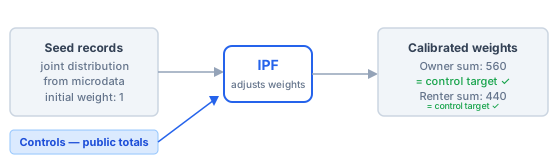
In IPF calibration, the seed provides the joint distribution and the controls provide the targets. IPF adjusts weights until the weighted totals reach those targets. Controls do not change the seed’s variables — they constrain the weights.
Tree output validation. Generated household and person rows from a tree model can be checked against the same control tables to measure how well model-derived output matches public aggregates — without any weight fitting.
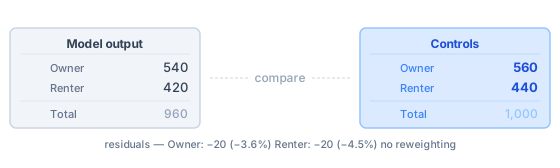
When validating tree output, controls are a yardstick rather than a fitting target. The residuals reveal how much the generated population drifts from the public aggregates — useful evidence when deciding whether to calibrate further or accept the model-derived distribution.
Small-area calibration. Census Profile controls split by census tract or aggregate dissemination area anchor generated candidate households to fine-grained geography.
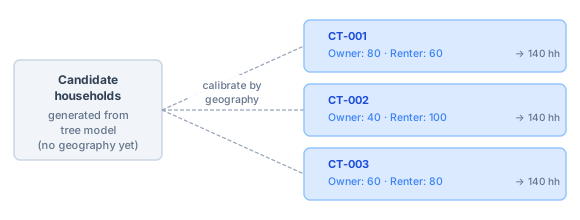
In small-area calibration, the same candidates are calibrated independently for each geography using that geography’s own control targets. Each census tract effectively runs its own IPF pass, so the resulting population matches local public aggregates rather than a single province-wide margin.
In every case the interpretive work is the same: decide which public table describes the population we are modelling, for which geography and year, at which level of detail, in categories that are compatible with the generated rows. That work happens before any algorithm runs.
What makes a control choice
The same Statistics Canada table can be turned into controls in many different ways. Choosing among them is a research question, not a lookup:
Which dimensions matter? Age and sex are common starting points. Adding tenure, household size, or dwelling type changes what the calibration can claim.
Which geography? A province-level control and a census-tract control may come from the same source table but anchor to different geographic claims.
Which population universe? Persons in private households, all persons, private dwellings, and economic families are different universes. Controls from different universes should not be mixed without deliberate thought.
Which category mapping? A WDS table may label an age group “25 to 34 years” while the seed uses a numeric code. A category mapping is an explicit record of that interpretive choice.
If no source table exists for the controls we need, that is itself a finding. We can adjust the research question, use a proxy, or document the gap.
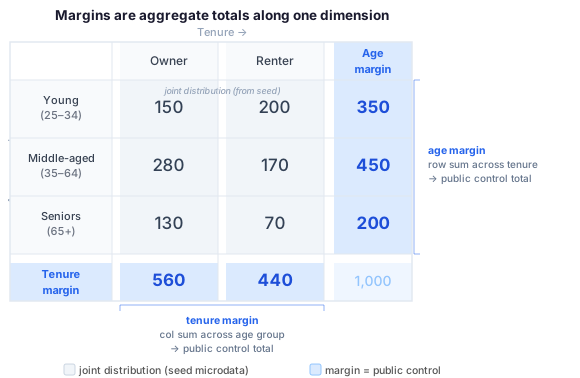
A margin is the aggregate total along one dimension of a multi-dimensional table. The grey internal cells come from seed microdata (the joint distribution we bring to the model). The blue margin cells are the public aggregate totals — the controls — that Statistics Canada publishes and that the synthetic population must match. Each margin is independent: we can use the age margin alone, the tenure margin alone, or both together.
Format
SynthPopCan uses a normalized long control format. Each row names a margin, lists which seed column or columns define it, and gives the target count for one category combination:
margin,dimensions,AGEGRP,SEX,count
age,AGEGRP,adult,,100
age,AGEGRP,child,,100
sex,SEX,,F,100
sex,SEX,,M,100
Here age and sex are two separate one-way margins. Each constrains one
variable at a time. The blank cells in each row indicate that column is not
part of that margin: the age rows do not specify sex, and the sex rows do
not specify age. IPF can satisfy both simultaneously because they are
independent constraints — it adjusts weights until the adult count hits 100
and the female count hits 100, without linking the two. A one-way margin
makes no claim about the relationship between variables; it only anchors each
marginal distribution.
Joint margins constrain a cross-tabulation — the joint distribution of two or more variables at once:
margin,dimensions,AGEGRP,SEX,count
age_sex,"AGEGRP,SEX",adult,F,55
age_sex,"AGEGRP,SEX",adult,M,45
age_sex,"AGEGRP,SEX",child,F,45
age_sex,"AGEGRP,SEX",child,M,55
A joint margin makes a stronger claim: it specifies 55 adult females, not merely 100 adults and 100 females whose sex-age correlation can be anything. This anchors how the variables co-vary in the synthetic population, not just their separate marginal distributions. Joint margins are worth using when a published Statistics Canada table provides the cross-tabulated totals and we have a specific research reason to preserve the correlation.
Seed coverage. For IPF to fit a margin, every category cell in that margin must be represented by at least one seed record. A one-way age margin only needs at least one adult and one child — usually easy to satisfy. A joint age × sex margin needs a record in every combination: adult female, adult male, child female, child male. The more dimensions and finer the categories, the more likely some combinations will be absent from the seed (“zero coverage”).
IPF cannot move a zero-coverage cell — there are no records to reweight. The
cell stays at zero while the remaining cells absorb all the adjustment,
distorting the rest of the margin in ways that are hard to detect. The command
synthpopcan ipf check-inputs flags zero-coverage cells before any fitting
begins; treat its output as a required check, not an optional one.
As a practical rule: start with one-way margins and confirm the fit is acceptable before adding joint margins. A joint margin across three or more dimensions multiplies the cell count quickly — 5 age groups × 2 sexes × 3 tenure categories is already 30 cells that must all be covered — and requires a correspondingly rich seed.
If we still need to find or download the source table, start with Statistics Canada Sources. Once controls are normalized, use IPF to check seed compatibility and fit weights, or Validate to evaluate generated output against them.
Getting Started
The typical workflow has two phases. First, normalize a raw source table into SynthPopCan’s long control format — the normalized CSV is what all downstream commands consume. Then validate the result to confirm the file is structurally correct and, separately, that it is compatible with the seed before fitting.
If we have an existing normalized file and want to check its structure:
synthpopcan controls validate controls.csv
If the source is a raw long CSV (already has one row per category combination but not yet in the margin/dimensions/count layout):
synthpopcan controls from-csv source-controls.csv \
  --out controls.csv
If the source is a Statistics Canada WDS ZIP, inspect it first to find the right column names, then normalize:
synthpopcan controls wds inspect table.zip
synthpopcan controls from-wds table.zip \
  --dimensions "GEO,Age group,Sex" \
  --count-column VALUE \
  --margin-name population \
  --out controls.csv
Once normalized, check the controls against the seed before fitting. This is the step that catches zero-coverage cells — categories in the controls that have no matching records in the seed:
synthpopcan ipf check-inputs \
  --seed seed.csv \
  --controls controls.csv
Fitting is documented in IPF. Measuring how well generated output matches controls — without refitting — is documented in Validate.
Subcommands
controls validate
Checks the structure of a normalized controls CSV. Confirms that the required
columns (margin, dimensions, count) are present, that every dimension
named in the dimensions column actually exists as a column in the file, and
that count values are non-negative integers. This is a structural check on the
file itself — it does not check whether the controls are compatible with a
specific seed. Use ipf check-inputs for that.
synthpopcan controls validate controls.csv
controls from-csv
Converts a raw local long CSV into SynthPopCan’s normalized control format.
Use this when we already have a file with one count per category combination
but it is not yet in the margin/dimensions/count layout — for example,
a table assembled manually or downloaded from a non-WDS source.
synthpopcan controls from-csv source-controls.csv \
  --out controls.csv
controls from-wds
Converts a Statistics Canada WDS (Web Data Service) CSV ZIP into normalized
controls. WDS ZIPs use a wide format with characteristic codes as rows; this
command picks which columns become margin dimensions (--dimensions), which
column holds the count values (--count-column), and optionally applies a
category mapping to translate WDS labels into the values used in the seed
(--mapping). Run controls wds inspect first to discover column names and
review the labels before normalizing.
synthpopcan controls from-wds table.zip \
  --dimensions Sex \
  --count-column VALUE \
  --mapping categories.json \
  --out controls.csv
Options:
--dimensions TEXT: comma-separated WDS column names to use as margin dimensions.--count-column TEXT: WDS column that holds the count values.--margin-name TEXT: name for the generated margin (used in themargincolumn of the output).--mapping PATH: JSON file mapping raw WDS labels to seed column values.--out PATH: path for the output controls CSV.
controls wds inspect
Displays the column names, unique dimension values, and characteristic codes
found in a WDS ZIP without converting it. Run this before from-wds to
confirm which dimension columns exist, what labels they use, and whether those
labels will need a mapping file to match the seed.
synthpopcan controls wds inspect table.zip
synthpopcan controls wds inspect table.zip --format json
controls wds mapping-template
Writes a starter JSON file mapping raw WDS category labels to the values used
in seed columns. WDS tables label categories in plain language (“25 to 34
years”, “Females”) that rarely match seed column values directly; the mapping
file is the explicit record of that correspondence. Use --preset canonical to
pre-fill mappings for labels SynthPopCan already recognizes, or --preset blank for a completely empty template. Always review and edit the file before
passing it to from-wds --mapping.
synthpopcan controls wds mapping-template table.zip \
  --dimensions "Age group,Sex" \
  --preset canonical \
  --out categories.json
controls census-profile inspect
Searches a Census Profile CSV for characteristic rows matching a keyword. A full Census Profile download contains thousands of rows; this command filters them so we can find the specific characteristics — age groups, household size, tenure, etc. — before writing a mapping template. Repeat with different search terms until we have identified the rows we need.
synthpopcan controls census-profile inspect profile.csv \
  --search "years"
controls census-profile template
Writes a pre-built mapping template for common Census Profile characteristics.
The named templates cover characteristic rows and category labels that
SynthPopCan already knows how to handle. Review the output before passing it
to from-census-profile --mapping, and extend it manually if we need
characteristics beyond what the template covers. Available templates currently
include age5 and sex.
synthpopcan controls census-profile template age5 \
  --out census-profile-mapping.json
controls from-census-profile
Normalizes a Census Profile CSV into SynthPopCan’s control format using a
reviewed mapping file. The mapping identifies which characteristic rows to
extract and how to label their categories in the output. Produce the mapping
with census-profile template or write it by hand using census-profile inspect to locate the right rows. The resulting controls CSV can be passed
directly to controls validate and ipf check-inputs.
synthpopcan controls from-census-profile profile.csv \
  --mapping census-profile-mapping.json \
  --out controls.csv
Troubleshooting
Valid controls still fail ipf check-inputs: the controls may be valid, but
not compatible with that seed. Check missing columns and category labels.
Too many dimensions: start with a simpler margin. Add joint margins after a one-way fit works.
Unclear category labels: create and keep a mapping file. Category mapping is an interpretive research decision, not just a technical step.
Further Reading
Statistics Canada WDS REST base used by SynthPopCan: https://www150.statcan.gc.ca/t1/wds/rest.
Statistics Canada 2016 Census Profile download endpoint used by SynthPopCan: GetFile.cfm.
IPF background: Iterative proportional fitting.